SimpleHaven for iPhone and iPad
Your home, in 3D, with your accessories where they really are.
SimpleHaven measures the inside of your house with the depth sensor in your iPhone and builds a 3D model of it — real rooms, real dimensions. Your Apple Home accessories sit in that model at the spots they physically occupy, so the light over the kitchen table is the light over the kitchen table, not “Lamp 3”.
We named it Simple because that was the hard part.
On the App Store now. Free to scan your whole home and place up to five accessories; US$39.99 once lifts every limit. iPhone or iPad with a LiDAR Scanner, running iOS 18 or later. No subscription.
See it
The scan is the easy part. Everything after it is the app.
Any depth sensor can measure a room. The work is making the model yours without a manual: drag a device to where it sits, press and hold to move or resize it, tap a wall or a floor to recolour it, nudge a piece of furniture with a fingertip. No coordinates, no grid, no numbers to type. That is the part the name is about.
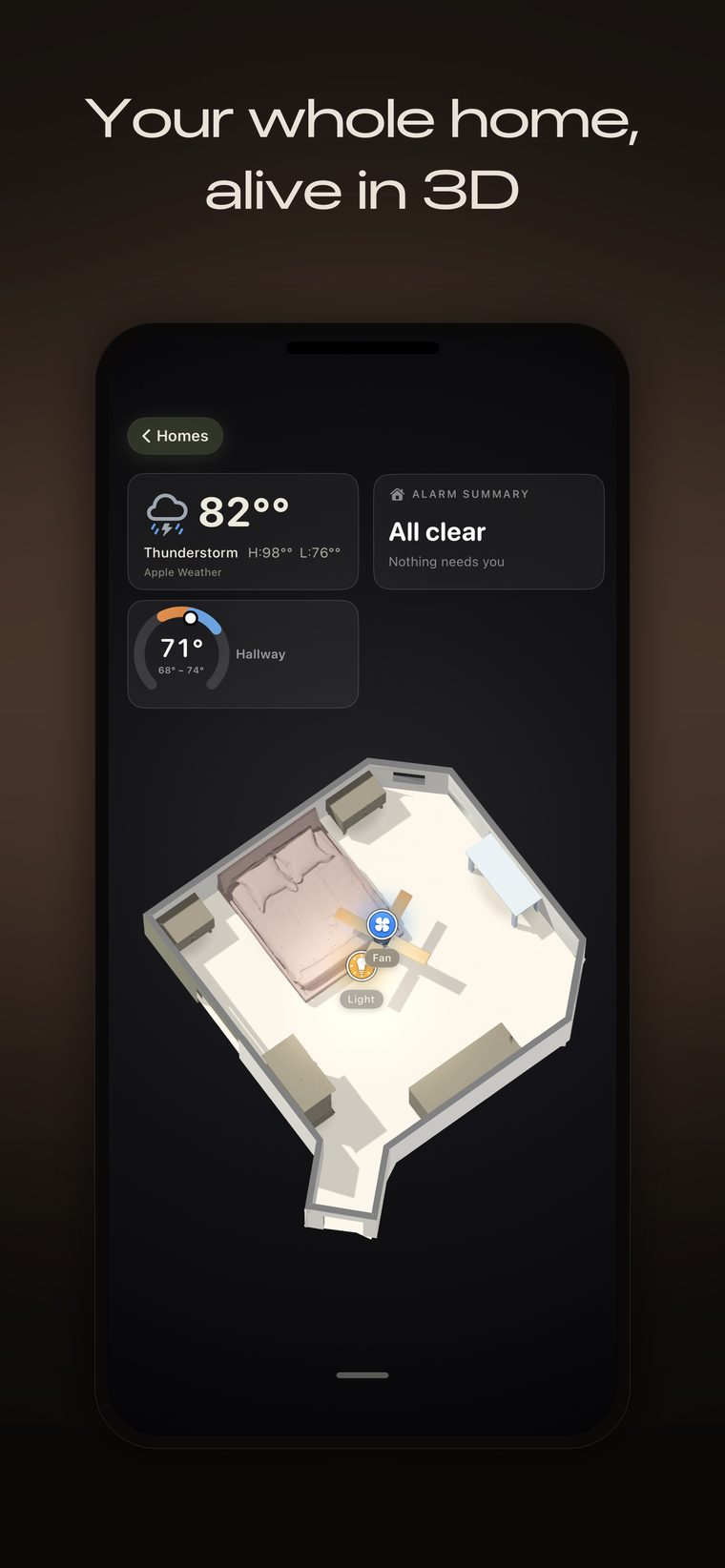
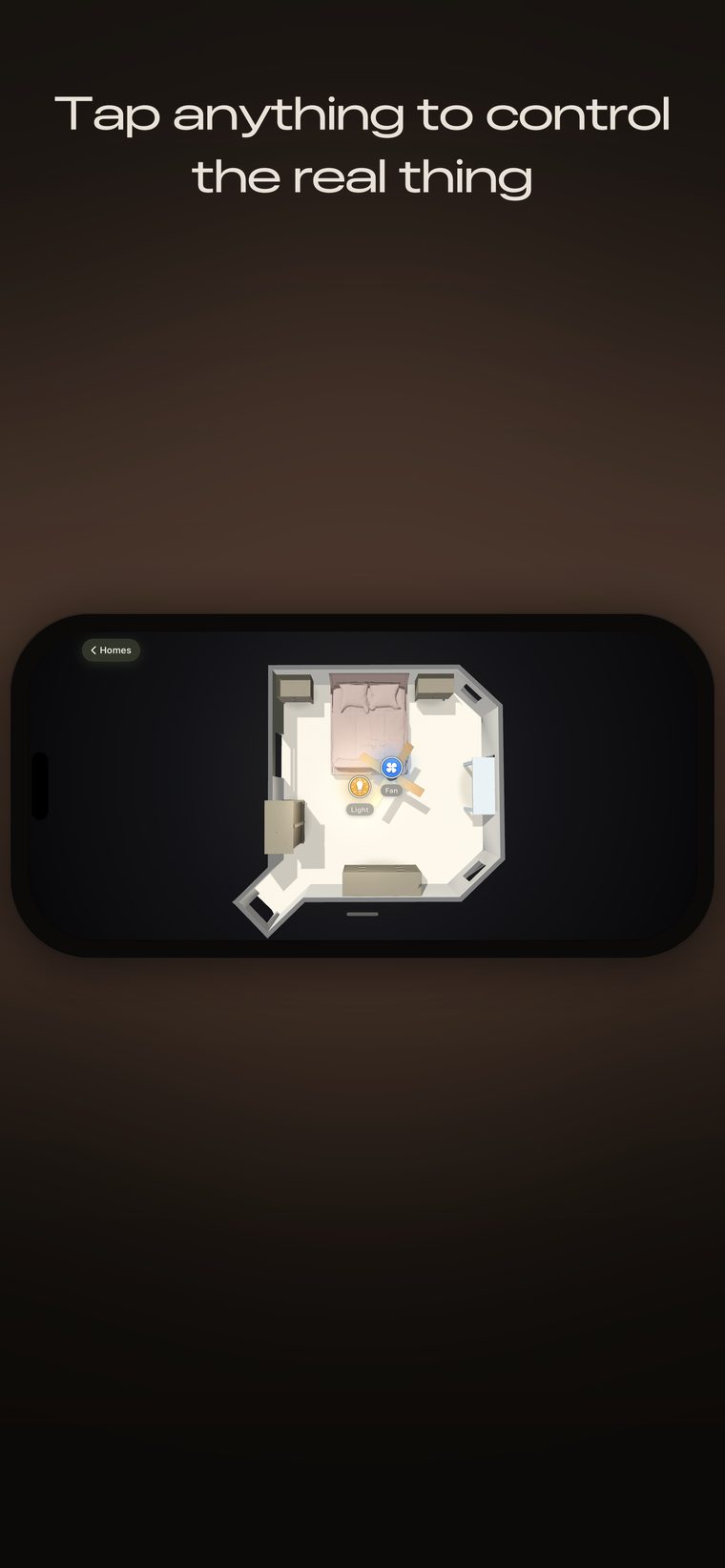
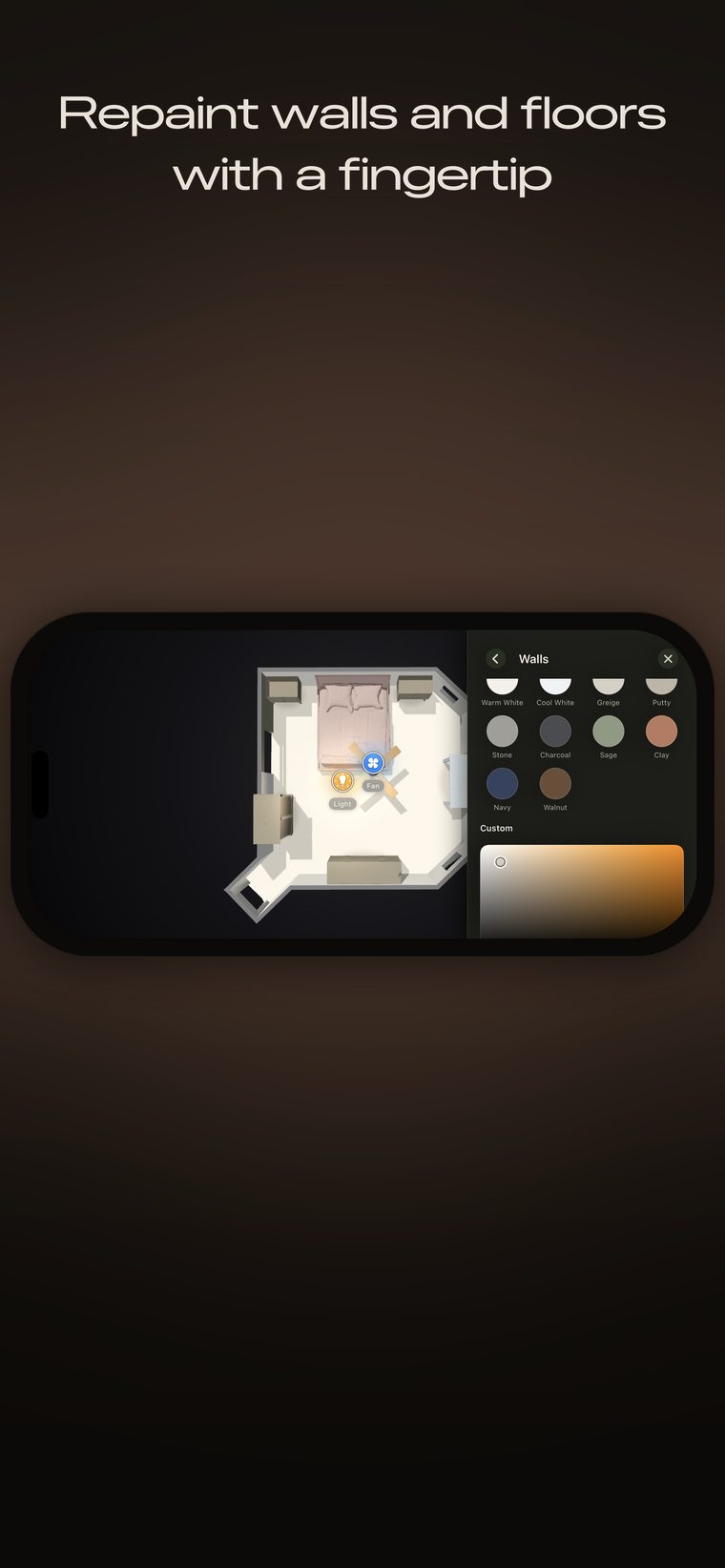
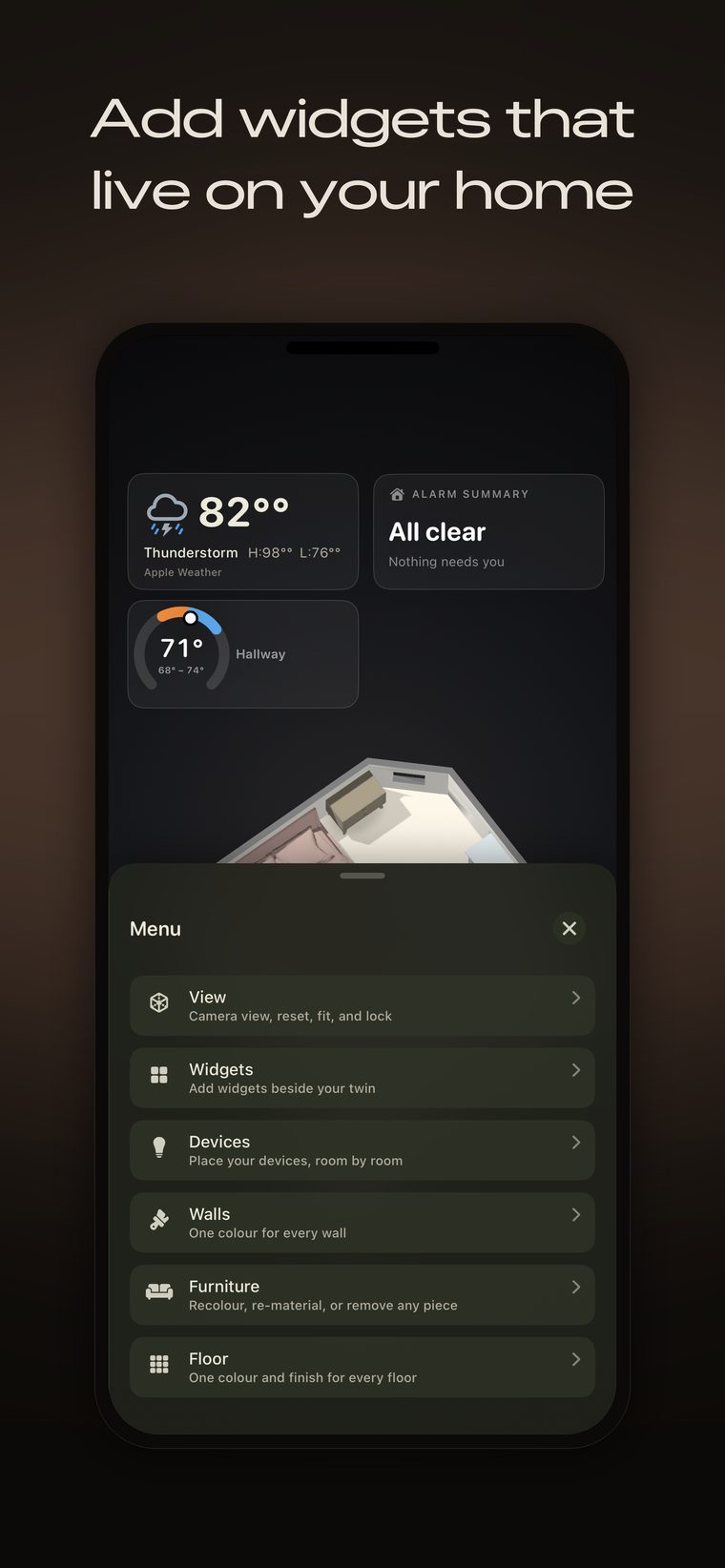
Screens from SimpleHaven on iPhone. Your home, your rooms, your colours — every model is scanned from a real house, so no two look alike.
What it is
A list of names tells you nothing. A model of your house tells you immediately.
You already have an app that shows your lights as a list. This isn’t another one. Four accessories fit in a list; forty do not — you end up scrolling through names you invented eighteen months ago, trying to remember which lamp is which, and tapping the wrong one to find out.
It measures the house you actually live in
SimpleHaven uses Apple’s RoomPlan framework and the LiDAR Scanner in your iPhone or iPad to capture real geometry: wall positions, ceiling heights, where the doors and windows sit, and the furniture standing in the room. Not a floor plan you drew from memory. The room you walked through, at its real size.
It reads the colours of your floors and walls from the same capture, so the model comes out looking like your home rather than a grey box. Furniture is matched to the closest shape in a built-in catalogue, which makes it a likeness rather than a photograph — more on that below.
- Capture
- Apple RoomPlan · LiDAR Scanner
- Scale
- Whole homes, up to four floors
- Output
- A measured 3D model with real dimensions
- Where it runs
- Entirely on your device
Your accessories live in it
SimpleHaven reads the accessories you have already set up in Apple Home and puts each one in the model at the place you say it belongs. Every accessory keeps its live state, so you can see at a glance what is on, what is unlocked, what is open, and what has a low battery — and you can operate any of it from there.
Names come from Apple Home. Naming your accessories and rooms is something you do once, in Apple’s Home app, and SimpleHaven does not ask you to do it a second time in a second place. There is one accessory in SimpleHaven for every accessory in Apple Home. A ceiling fan and the light built into it are two accessories in Apple Home, so they are two here as well.
- Source
- Accessories you have already added to Apple Home
- Placement
- You decide where each one goes
- Naming
- Apple Home, always — no second set of names
- Control
- Live, through Apple’s HomeKit framework
Where we are different
Four decisions, not four features.
What separates SimpleHaven from other smart home apps is mostly not a feature list. It is a handful of choices we made early and will not walk back.
One price, once
US$39.99, a single payment, for the whole house. No subscription, no annual renewal, no charge per room, no charge per accessory. Buy it and you own it. Most of this category bills you every month, and that is a business decision rather than a technical one.
Built to be corrected
No scan of a real house comes out perfect. A room gets approximated, a chair becomes the nearest chair in the catalogue, a colour reads too dark. SimpleHaven lets you correct what came out wrong instead of handing you a model you have to accept. We would rather say that on the page where you decide whether to buy than have you discover it afterwards.
A measurement, not a drawing
You do not sketch a floor plan, drag walls into place, or pick a stock room that looks close to yours. SimpleHaven measures your actual rooms with the depth sensor in your iPhone, so the dimensions on screen are your dimensions.
It runs on your iPhone
Scanning, matching and rendering all happen on the device. The finished model is stored in your own iCloud rather than on a server we operate, because a measured model of the inside of your house is about as personal as data gets.
Who it is for
People with more smart home than they can remember
SimpleHaven is built for the inside of a home you live in. It is most useful once a house has enough accessories that a list has stopped being a good way to find them.
Households with a lot of accessories
If you have more than a dozen lights, plugs, locks, sensors and fans across several rooms, a picture of the house is faster than a list of names you have to decode.
Families where one person set it all up
Everyone else in the house inherited the names. A model shows where things are without anyone having to learn a naming scheme.
People who want to see the house at a glance
Open the model, see which lights are on, whether a door is unlocked, whether a leak sensor is unhappy — laid out the way the house is laid out.
People who like owning software
One purchase, no subscription, no account, and nothing about your home held on a company server. If that matters to you, it is the reason this app is built the way it is.
Who it is not for
It is not a surveying, construction or commercial-property tool, and it is not a life-safety product. It is a home app.
On a wall
Left on a screen, it becomes the dashboard of the house.
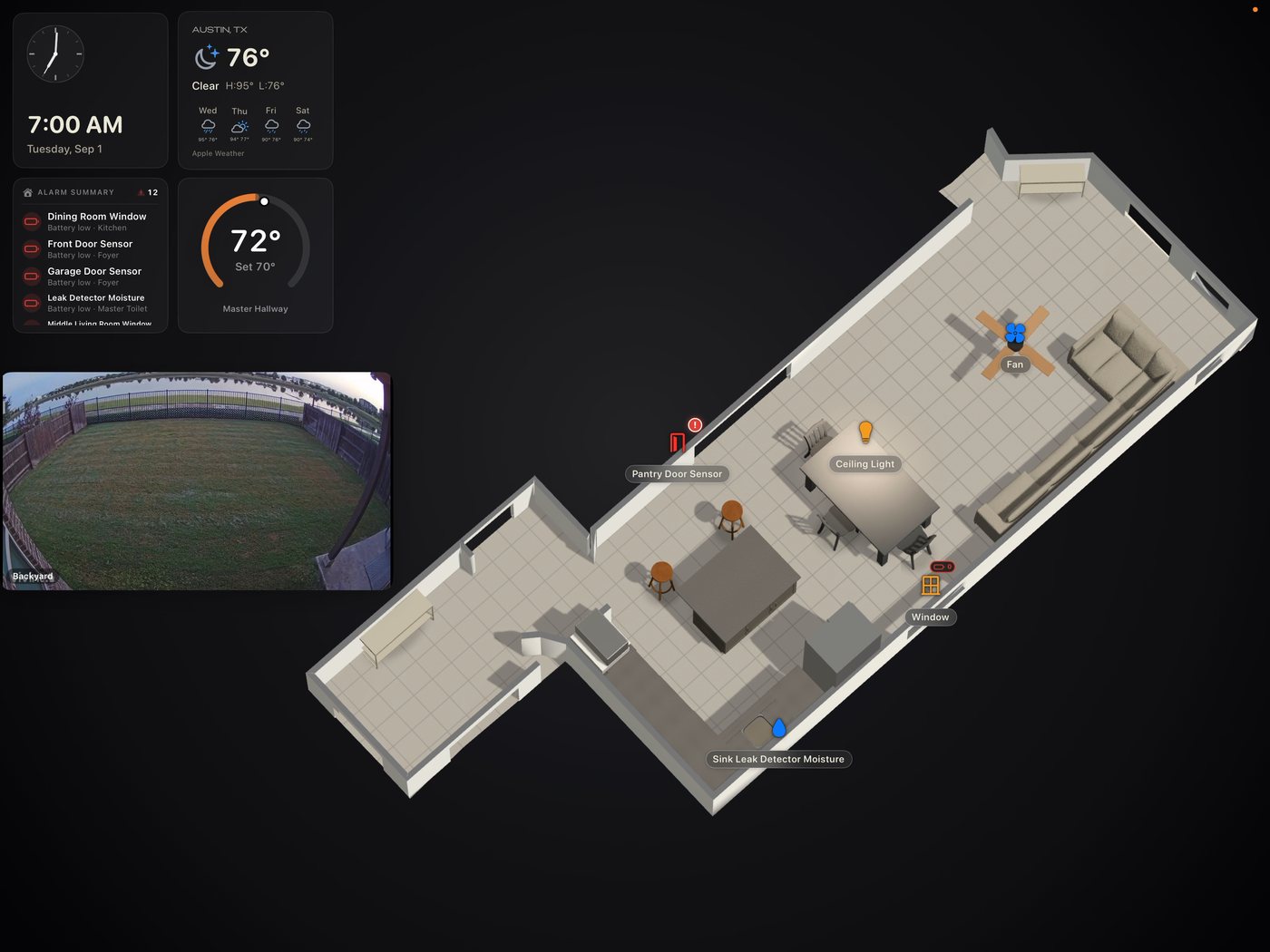
Set an iPad on the counter or a display on the wall and SimpleHaven settles into a live view of your home — the time, your local weather, what the alarm and sensors are saying, the temperature it is holding, a camera if you have one, and the house itself in 3D. It sits there and stays current, so a glance from across the room tells you the state of the place.
Apple Home
What comes through from Apple Home
SimpleHaven reads your home through Apple’s HomeKit framework, with your permission, on your device. Whatever Apple Home can see, SimpleHaven can see — regardless of who made the accessory or whether it speaks HomeKit, Matter or Thread underneath.
The two tables below are the full list of accessory types SimpleHaven recognises today. The first covers the ones you can operate. The second covers the ones that report a reading rather than take an instruction.
Accessories you can operate
Each of these appears at its place in the model and shows what Apple Home last reported for it. Where an accessory takes an instruction, you give it from there. Four of them are shown but not operated, and they are marked as such: buttons and scene controllers are inputs rather than outputs, and doorbells and cameras are placed in the model without a video feed.
| Accessory | What it shows |
|---|---|
| Lights | On or off, brightness, and the colour a colour-capable bulb is currently set to |
| Outlets and smart plugs | On or off |
| Wall switches | On or off |
| Buttons and scene controllers | Present in the model; stateless buttons report a press rather than a state. Shown, not operated |
| Fans, including ventilation fans | On or off, speed |
| Thermostats | Current temperature, target temperature, heating and cooling mode |
| Heaters and air conditioners | Current and target temperature, mode |
| Humidifiers and dehumidifiers | Current humidity, target humidity |
| Air purifiers | On or off |
| Locks | Locked, unlocked, or moving between the two |
| Garage door openers | Open, closed, opening or closing |
| Powered doors and windows | Open, closed, and how far |
| Blinds, shades, drapes and slats | Open, closed, and how far |
| Security systems | Armed for home, armed for away, armed for night, disarmed, or sounding |
| Valves, faucets and shower valves | Open or closed |
| Irrigation systems | Running or not |
| Televisions and speakers | On or off, at their place in the room |
| Doorbells | Shown at the door, and reports a press. Shown, not operated, and there is no video feed |
| Cameras | Shown at the camera’s position in the model. Shown, not operated, and there is no video feed |
Sensors it reads
Sensors do not take instructions. SimpleHaven puts each one where you say it lives and shows what it currently reports.
| Sensor | What it reports |
|---|---|
| Motion sensors | Motion detected, or clear |
| Occupancy sensors | Occupied, or empty |
| Contact sensors | Open or closed — doors, windows, cabinets |
| Temperature sensors | Current temperature |
| Humidity sensors | Current relative humidity |
| Light sensors | Current light level |
| Air quality sensors | Current air quality |
| Leak sensors | Water detected, or dry |
| Smoke sensors | Smoke detected, or clear |
| Carbon monoxide sensors | Detected, or clear |
| Carbon dioxide sensors | Detected, or clear |
| Battery-powered accessories | Battery level, and a low-battery warning |
Two things worth knowing before you count your accessories
SimpleHaven does not set anything up. Pairing, adding and configuring accessories all happen in Apple’s Home app, the same as they do today. SimpleHaven reads what is already there.
Accessory state can be stale or wrong. What you see is what Apple Home last reported, and an accessory that has dropped off the network reports nothing at all. For anything that matters — a lock, an alarm, a leak — use the accessory maker’s own app and a real safety system.
Requirements
What you need
Nobody should need to know what the Z axis is to turn on a lamp.
- To scan
- An iPhone or iPad with a LiDAR Scanner, running iOS 18 or iPadOS 18 or later. That is the Pro and Pro Max iPhone models from iPhone 12 Pro onward, and iPad Pro models from 2020 onward. The scan uses the depth sensor, so it works in a dim room and does not need markers, targets or a tape measure.
- To view
- Any iPhone or iPad running iOS 18 or iPadOS 18 or later, signed in to the same Apple Account. A device without a LiDAR Scanner cannot start a scan, but it opens homes that were scanned on another device and syncs through iCloud, and it controls accessories normally.
- iCloud
- Required. You need to be signed in to iCloud with iCloud Drive turned on. SimpleHaven keeps your home in your own private iCloud database rather than on a server of ours, so without iCloud there is nowhere for it to put anything — the app says so plainly instead of running in a half-broken state.
- Apple Home accessories
- The model of your home works on its own. If you use Apple Home, SimpleHaven shows and controls the accessories you have already added to it.
- Away from home
- To reach accessories when you are not on your home Wi-Fi, Apple Home needs a home hub — a HomePod or an Apple TV that stays at the house. That is Apple’s requirement, not ours, and it applies to Apple’s own Home app too. Your 3D model still opens either way.
- Permissions
- Camera and depth, for scanning. Apple Home access, if you want your accessories. Location once, while you scan. Each one is asked for at the moment it is needed and each one can be refused.
Privacy
A floor plan of your house is about as personal as data gets
So SimpleHaven is built so that we never hold one. This is not a policy we promise to follow. It is how the app is put together, and the consequences run in our direction too: a company that cannot read your home cannot lose it, leak it, or be made to hand it over.
The work happens on your device
Scanning, colour and material matching, furniture matching and rendering all run on the iPhone or iPad in your hand. Nothing is sent away to be processed and sent back. There is no cloud rendering in this version of the app, and the code path for it is switched off.
Your home lives in your iCloud, not ours
Your rooms, dimensions, colours, accessory placements and names are stored in your private CloudKit database — part of your own iCloud storage, under your Apple Account. That is what syncs your home between your iPhone and your iPad. We have no read access to it. We do not operate a server that holds scans, because there is nothing for one to hold.
There is no account to create
No sign-up, no email address, no password, no profile. Your Apple Account is the only identity involved, and Apple already has it. We do not have a password database, because we do not have users in the sense that would require one.
No analytics, no advertising, no trackers
The app contains no analytics SDK, no advertising SDK and no third-party tracking library. Its privacy manifest declares no tracking and no tracking domains. We do not sell personal information and we do not share it for cross-context behavioral advertising, in the specific senses those phrases carry under California law.
Location is read once, and never in the background
If you allow it, SimpleHaven reads your approximate location a single time while you are scanning a home, so that daylight in your model matches your part of the world. It is stored with that home. There is no background location tracking of any kind, and refusing the permission costs you nothing but that.
What actually reaches us
The app verifies your purchase on your own device through Apple’s StoreKit, so no purchase data is sent to us. Crash and diagnostic data stays on your device and reaches us only if you have turned on Apple’s “Share with App Developers” setting and then choose to send a report. And any email you choose to send us. That short list is why our App Store privacy label reads “Data Not Collected.”
Deleting is genuinely deleting
Delete a home in the app and it goes from your device and from your iCloud. There is no copy on our side to chase, because your scans never came to us. If your device cannot reach iCloud at that moment, the app tells you instead of pretending the deletion finished.
Read the full privacy policy · How scans are handled, and how to report a vulnerability
Pricing
US$39.99, once. No subscription, no trial.
Scan your whole home and place your first five accessories for free, for good. One purchase lifts every limit — unlimited devices and widgets, more homes, more floors — and it stays yours, including every update afterwards.
Free
$0
No purchase, no time limit
- Scan your home — no room limit, no square-footage cap, nothing locked or greyed out
- Every editing tool: walls, floors and furniture
- Place up to five accessories — a device or a widget, in any mix — and control them live through Apple Home
- One home, on a single floor
SimpleHaven Lifetime
$39.99
One-time in-app purchase · not a subscription
- Unlimited accessories and widgets, placed anywhere in the model
- Homes with more than one floor, up to four
- As many homes as you want
- Every future update, at no extra cost
To be exact about it
SimpleHaven Lifetime is a one-time, non-consumable in-app purchase of US$39.99, charged to your Apple Account. It does not renew. There is no free trial and there is no subscription of any kind. It supports Family Sharing and restores on any device signed in to the same Apple Account. Prices outside the United States are set from Apple’s pricing matrix and are shown to you before you buy. Refunds are handled by Apple.
The free tier lets you place up to five accessories across your home — each one a device or a widget, counted together across the whole home. Delete one and its slot opens up again; the sixth is where SimpleHaven Lifetime comes in. Everything else — scanning your home and editing its walls, floors and furniture — is free.
Straight answers
What this app is not
SimpleHaven builds an approximation of your home from a depth scan. Room shapes, furniture, colours and materials are estimates. Furniture is matched to the closest item in a built-in catalogue, so a chair that is not in the catalogue becomes the nearest chair we have. Your model will not be an exact replica: some things will be approximated, some mismatched, some missing. You can correct what came out wrong, and that ability exists precisely because scanning is imperfect.
It is not a security system, an alarm, a leak detector, or any kind of life-safety product, and it should never be the thing you rely on to know whether your house is safe.
It is not a surveying, construction or commercial-property tool, and the measurements are not suitable for building work.
We would rather say all of this on the page where you decide whether to buy than have you find it out afterwards.
The company
Who makes SimpleHaven
SimpleHaven is made by SimpleHaven Technologies LLC, a Texas limited liability company. simplehavenapp.com is our only website. Email goes to a person, and a person answers it.
- Legal name
- SimpleHaven Technologies LLC
- Type
- Texas limited liability company
- Support
- support@simplehavenapp.com
- Privacy
- privacy@simplehavenapp.com
- Security
- security@simplehavenapp.com
- Legal
- legal@simplehavenapp.com
SimpleHaven for iPhone and iPad is on the App Store. Everything described on this site is something the app does today, not something planned.
Questions
Common questions
Which iPhone and iPad models can scan?
Scanning needs the LiDAR Scanner: the Pro and Pro Max iPhone models from iPhone 12 Pro onward, and iPad Pro models from 2020 onward, running iOS 18 or iPadOS 18 or later.
Can I use it on a device that has no LiDAR Scanner?
Yes, as a viewer. It opens homes that were scanned on another of your devices and synced through your iCloud, and it controls your accessories normally. It just cannot start a scan.
Do I need Apple Home accessories to use it?
No. The 3D model of your home works on its own. Accessories add control on top of it.
Is iCloud required?
Yes. SimpleHaven stores your home in your own private iCloud database rather than on a server of ours, so it needs you signed in to iCloud with iCloud Drive on. Without that there is nowhere for it to keep your home.
Is it a subscription?
No. US$39.99, once, as a non-consumable in-app purchase. It does not renew. There is no trial.
I bought it, then reinstalled. How do I get it back?
Open the app, go to the unlock screen and choose Restore Purchases. Any device signed in to the same Apple Account gets the unlock back. If it does not, email us with the date of purchase and we will help you sort it out with Apple.
How do I get a refund?
Apple handles all App Store refunds; we cannot issue one directly. Request it at reportaproblem.apple.com. If something in the app misled you into buying, tell us as well — we would rather know.
Does my scan leave my phone?
Only to your own iCloud, so that it reaches your other devices. It is stored in your private CloudKit database, which is part of your iCloud storage. We have no read access to it and no server holding a copy.
Do you sell my data?
No. We do not sell personal information and we do not share it for cross-context behavioral advertising. There is no analytics SDK, no advertising SDK and no third-party tracker in the app. The privacy policy sets out the detail.
My accessories are not showing up.
Check Settings → Privacy & Security → HomeKit on your device and confirm SimpleHaven is allowed. Then confirm the accessory appears in Apple’s own Home app — if it is not there, SimpleHaven cannot see it either. If both look right and it is still missing, email us the accessory type and its maker.
I opened the app away from the house and it shows no accessories.
Apple Home needs a home hub — a HomePod or Apple TV that stays at the house — to reach your accessories when you are not on your home Wi-Fi. Without one, Apple returns an empty list and there is nothing SimpleHaven can do about it. Your 3D model still opens.
How do I get help?
Email support@simplehavenapp.com. We aim to acknowledge within two business days and to give you a real answer — a fix, a workaround, or an honest “not solved yet” — within five. The support page says what to include in a bug report.